
CIJ Printer Maintenance: Daily Weekly Monthly Checklist
CIJ printer maintenance keeps a continuous inkjet coder printing clear dates, batch codes and barcodes with fewer stops. Follow a simple daily, weekly and monthly checklist: check ink and make-up levels, keep the printhead clean, use the matched CIJ make-up solvent, and shut the printer down correctly so you prevent CIJ nozzle clogging between shifts.
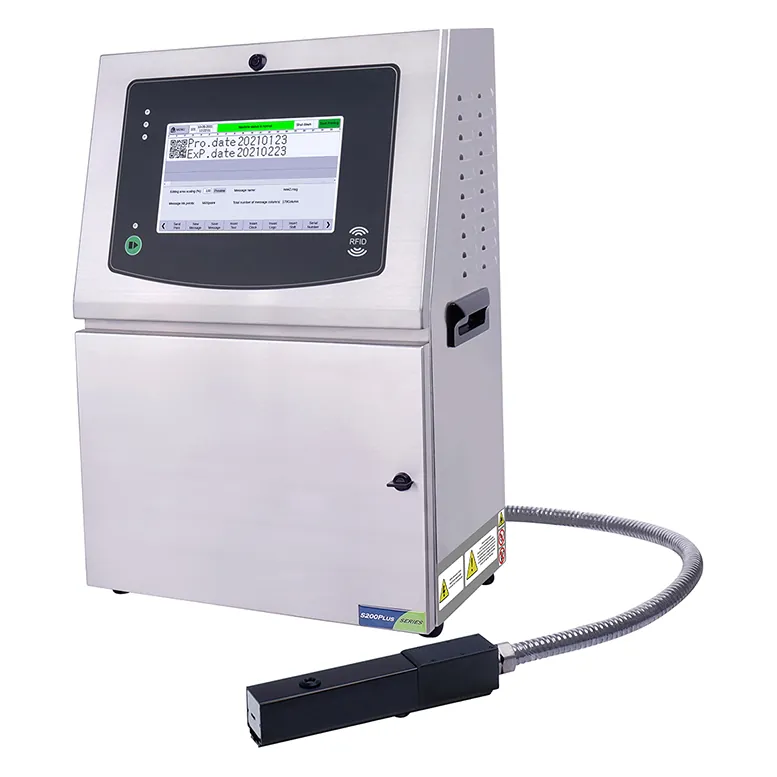
This guide from Shenzhen Mufeng Technology Limited Company explains what continuous inkjet (CIJ) maintenance covers, why make-up solvent matters, and a practical checklist you can adapt to printers such as the MFS200 Plus series.
What is CIJ printer maintenance?
CIJ printer maintenance is the set of checks and cleaning steps that keep the ink circuit, printhead and electronics stable. A CIJ printer pushes ink through a nozzle as a continuous stream of drops; only the charged drops are deflected onto the product, and the rest return to the system.
Because solvent evaporates while the printer runs, viscosity rises and the printer adds CIJ make-up solvent to bring viscosity back to its set value. Matching ink and make-up, keeping the head clean, and following start/stop routines are the core of preventing faults.
Why make-up solvent and cleaning matter
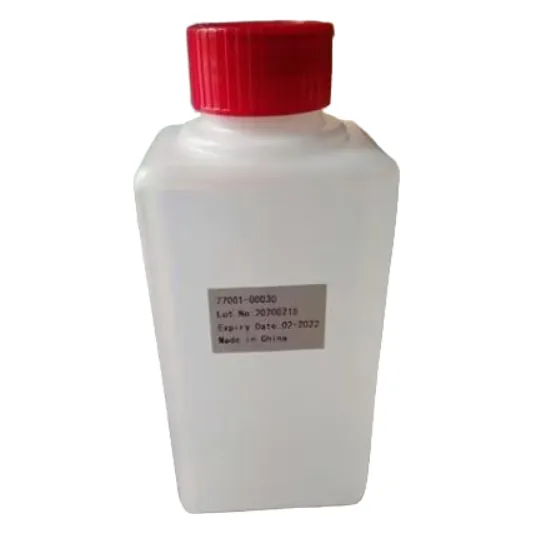
Make-up solvent (also called make-up or thinner) is not optional consumable fluff. Using the wrong make-up changes the ink chemistry and can affect adhesion, drying and print quality. Always pair ink and make-up for your printer brand and colour.
MufengTech CIJ printers such as the MFS200 Plus series continuous inkjet printer include automatic cleaning features designed to reduce clogging, a 10.1-inch screen, and modules that can be serviced independently. Character height is listed as 2 to 20mm, with a best printing distance of 12mm and a maximum printing speed of 384m/min. These features help, but they do not replace daily operator checks.
Browse matching fluids on our CIJ inks and solvents pages, and confirm the exact make-up for your printer model before you order.
CIJ printer maintenance: daily, weekly and monthly checklist
| Interval | Focus | Typical checks |
|---|---|---|
| Daily | Ready to print | Ink and make-up levels; print a test code; wipe the printhead face if dusty; confirm photocell and encoder; note any alarms |
| Weekly | Cleaner head and cabinet | Deeper CIJ printhead cleaning as your manual allows; clean cabinet vents and exterior; check hose routing and fittings for leaks; review message quality on real products |
| Monthly | Consumables and records | Review ink and make-up usage; inspect filters and service modules if your model uses them; update the maintenance log; schedule spare fluids before stock runs out |
Daily CIJ printer maintenance steps
- Check fluids before the shift. Confirm ink and make-up are above the minimum and are the correct pair for the printer.
- Inspect the printhead face. Look for dried ink, dust or product splash. Wipe only with the method and materials recommended for your head — never scrape the nozzle plate.
- Run a test print. Print a date, batch or barcode sample and check contrast, height and alignment at the listed best distance (12mm on the MFS200 Plus).
- Confirm sensors. Make sure the optical eye triggers on every product and that the encoder (if used) tracks line speed.
- Watch start-up behaviour. Use one-key start/stop where available and wait for a stable jet before releasing the line.
- Log alarms. Record any viscosity, pressure or head warnings so weekly maintenance can focus on recurring issues.
Weekly CIJ printhead cleaning and line care
CIJ printhead cleaning removes build-up that daily wipes miss. Follow your printer manual for wash routines and automatic clean cycles. On MufengTech S-series printers, automatic anti-clog cleaning is part of the design; still inspect the head after dusty or oily products such as cables, pipes and cartons.
Also clean the cabinet exterior, keep vents clear, and check that the umbilical hose is not kinked. A bent hose or loose fitting can look like an ink problem when the real issue is mechanical.
If you run large character codes on outer cases as well, keep that printer on its own schedule. Our MF-D230 industrial inkjet printer uses drop-on-demand technology and a different cleaning pattern from small-character CIJ.
Monthly tasks to prevent CIJ nozzle clogging
To prevent CIJ nozzle clogging over the long term, treat consumables and records as seriously as the daily wipe:
- Keep only matched ink and make-up on the shelf, labelled by printer brand
- Store fluids sealed, upright and away from heat, following the label on each bottle
- Plan fluid top-ups so operators are not tempted to mix leftover make-up from another ink family
- Review the maintenance log for repeated head faults, weak contrast or viscosity alarms
- Arrange service for filters and modules according to your printer documentation when monthly checks show rising issues
Operating windows matter too. The MFS200 Plus lists an operating temperature of 0 to 45°C (depending on the ink) and working humidity of 10% to 90% without frosting. Extremes outside those ranges make clogging and start-up problems more likely.
How to shut down and restart cleanly
- Finish the last products and print a short purge or clean cycle if your model provides one.
- Use the printer’s controlled stop rather than cutting power mid-jet.
- Cap or park the head as the manual describes for overnight stops.
- On restart, allow the jet to stabilise, check fluid levels, and test-print before releasing production.
Need high-resolution carton QR codes or TIJ cartridges instead of CIJ? See our sister site tijinkjet.com for thermal inkjet printers and ink cartridges.
FAQ: CIJ printer maintenance checklist
What is included in CIJ printer maintenance?
Daily fluid and printhead checks, weekly deeper cleaning and cabinet care, and monthly review of consumables, filters or service modules and the maintenance log.
Why must I use the matched CIJ make-up solvent?
The printer adds make-up to control ink viscosity as solvent evaporates. The wrong make-up changes the ink chemistry and can hurt adhesion, drying and print quality.
How often should I clean a CIJ printhead?
Wipe or inspect the head face every day in production. Do a deeper CIJ printhead cleaning weekly, or sooner if you code dusty, oily or heavily splashed products.
How do I prevent CIJ nozzle clogging?
Use matched ink and make-up, keep the head clean, follow controlled start/stop routines, store fluids correctly and stay within the printer’s listed temperature and humidity range.
How do I get maintenance advice for my model?
Contact Shenzhen Mufeng Technology Limited Company on WhatsApp +86 158 1405 1051 with your printer model, ink type and the fault or checklist you want to review.
Written by the team at Shenzhen Mufeng Technology Limited Company. WhatsApp: +86 158 1405 1051